
Suki Liu
About
Resume


Stackd
Key results
•
Reduced average clicks
by 43%
•
Improved task completion
rate from 68% to 91%
•
Decreased error rate by 52%
Role & Timeline
•
Product Designer
•
October 2024 – December 2024
January 2024 - March 2025
(independent design)
Methods
User Interviews / Usability Testing / Analytics Review / Information Architecture /Visual design / Prototyping / Testing
The Challenge
I was part of a team tasked with evaluating and improving the MVP of Treevah, a file management platform built to help teams organize and retrieve documents across complex, multi-layered folder structures. As the Product Designer, my focus was on understanding where the product was falling short through user research. After leaving the role, I channeled the findings into designing Stackd, my own design response to the problems I had uncovered. Our challenge was to help enterprise users know where the files are and find what they need, without getting lost.


Final results
Defining the Problem
User Interviews & Usability Testing
To understand where the MVP was breaking down, I ran user interviews and usability testing with existing users. Two problems stood out above everything else.
01 Users didn't understand the hierarchy
The folder structure was too complex and the interaction patterns were unclear. Users didn't know which layer they were on, kept navigating back and forth, and frequently got stuck before reaching their target file.
screenshot showing a user navigating back and forth through folder levels
02 Files all looked the same
Search results and folder views displayed files with similar names and no distinguishing information. Users had no choice but to open each file one by one just to find the right one.
Example file names:

Example file names with no distinguished information
Final Report
Final Report V2
Final Report FINAL
Then, I conducted problem discovery interviews with the users who passed the screening
to learn about their experience with 2FA, identify potential opportunities, and learn about
their compliance requirements.
Analytics & Team Feedback
To gather more data, we reviewed platform analytics and collected feedback from the team. The data confirmed what we heard in interviews. Users were spending a disproportionate amount of time on navigation and search, with the highest drop-off occurring when the folder hierarchy got too deep.
screenshot of analytics data, team feedback notes, or a FigJam board summarizing key findings
Building Stackd
With all the necessary research foundations in place, I began designing Stackd independently. I prioritized the two areas that caused the most friction: navigation and file differentiation. The design aimed to reduce cognitive load without disrupting familiar file management patterns, while making the hierarchy immediately readable and every file identifiable at a glance.
Interactive prototype in Figma (you can press "R" to refresh the prototype)
Navigation and Hierarchy Bar
Users had no sense of where they were within the folder structure. I redesigned the navigation to make the current path immediately visible, with breadcrumbs showing each layer, a persistent directory tree on the left, and clear visual indicators for the active folder.


side by side before and after — left showing the original Treevah navigation with no clear hierarchy, right showing your Stackd redesign
File Browser and Folder View
Rather than showing just a file name, each file now surfaces author, last updated time, version number, and a thumbnail preview. Same name files are grouped automatically, with a recommended final version clearly marked so users can identify the right file at a glance without opening anything.


side by side before and after — left showing the original file list with identical looking file names, right showing your Stackd design
Usability Testing
After completing the design, I ran a second round of usability testing with 5 users, giving them tasks based on the original pain points: navigating to a specific folder and identifying the correct version of a file. Both areas showed clear improvement over the original MVP in speed, confidence, and accuracy.
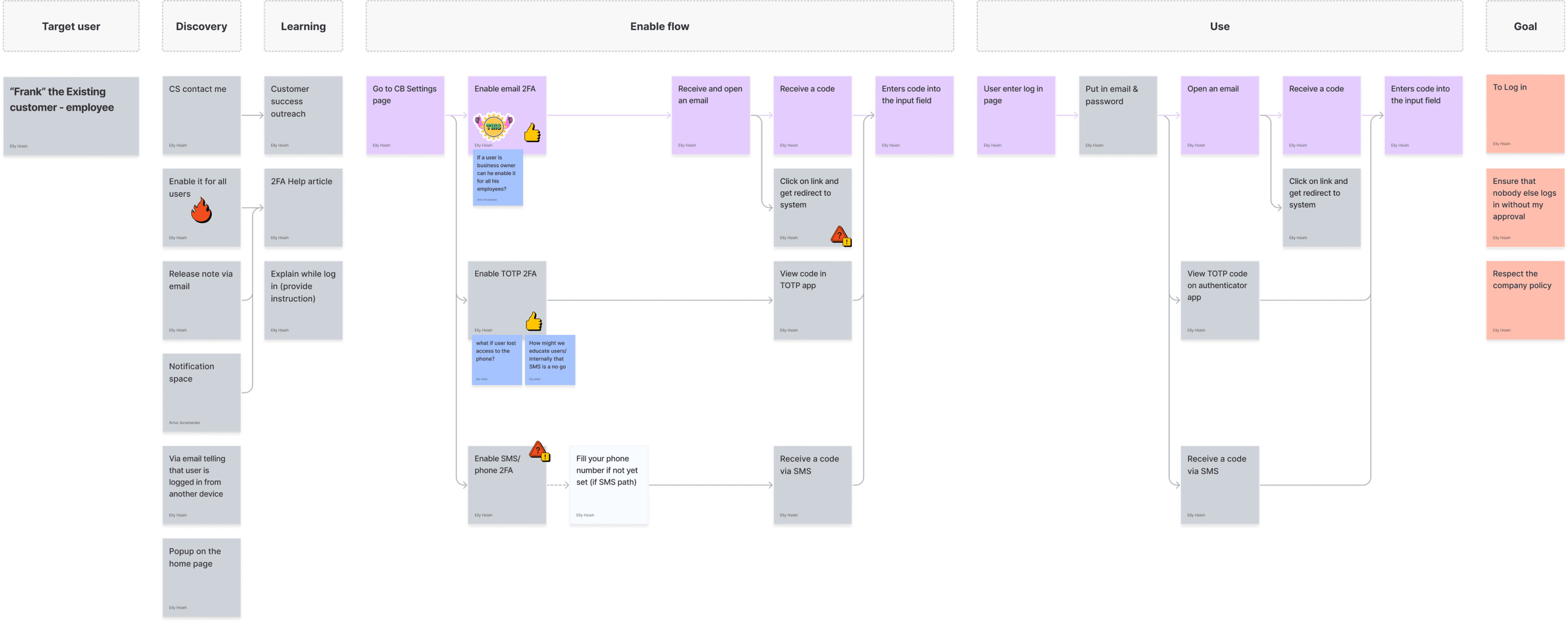
photo or screenshot of usability testing in progress
Impact
After the second round of usability testing, the results showed meaningful improvement across all key areas. Task completion rose from 68% to 91%, average clicks dropped by 43%, and error rate decreased by 52%. An AI file recommendation concept proposed as a further step received 80% positive feedback from users.


a clean metrics visual showing the before and after numbers

Next Steps
The next phase of Stackd will follow a gradual iteration strategy rather than a complete overhaul. Enterprise users already have established workflows that cannot be disrupted overnight. Data structure and technical constraints also limit the scope of changes that can be made at once. Most importantly, business goals require short term visible results. Rebuilding everything from scratch would delay value delivery and risk losing existing users in the process.
Expand testing with real enterprise users for more representative feedback.
Explore AI powered file suggestions where users input a rule and Stackd automatically reorganizes and renames files based on custom criteria.
Continue iterating on the search experience based on usability testing feedback.
AI Vision
The current design solves the navigation and file differentiation problems that exist today. But the longer term vision for Stackd is to eliminate the need to organize manually altogether.
Users should only need to input a rule. Stackd AI does the rest.
Through natural language or visual rule setting, Stackd AI would automatically classify and rename large volumes of files in seconds. For example, a user could type: "Sort by project → date → file type and reorganize" and the system would instantly restructure the entire workspace.
a clean metrics visual showing the before and after numbers
Reflection & learnings
The main challenge of this project was designing without a team or engineering support. As the sole designer working independently, I had to be disciplined about scope and ground every decision in the research already gathered rather than personal preference.
The biggest lesson was that research findings only have value if you act on them. Leaving a role with strong insights and choosing to build something from them independently taught me more about design conviction than any team project had before.
Research conducted during my time at Treevah. Independent design work is my own.


